| Block | Teaching | Activity | Output to keep |
|---|---|---|---|
| Purpose and app structure | 10 min | 5 min | An input/output map |
| UI controls and identifiers | 10 min | 5 min | A working control |
| Reactive data and outputs | 10 min | 5 min | A checked update |
| Break | — | 10 min break | — |
| Validation and empty states | 10 min | 5 min | A failure check |
| Download and peer testing | 10 min | 5 min | A reviewed output |
| Sharing and handover | 10 min | 5 min | An app and ownership record |
| Total | 60 min | 30 min | 100 min including the break |
This is lesson 8 of eight. Each five-minute activity includes a room response and debrief. Save work before the ten-minute break; use a practice copy and keep original inputs unchanged.
Complete lesson 7 and use the same project download. Prepare Shiny before class using Setup. Run the complete app.R in local RStudio; these excerpts explain its code and do not start a server inside the course page. A shared-screen demonstration is a valid fallback.
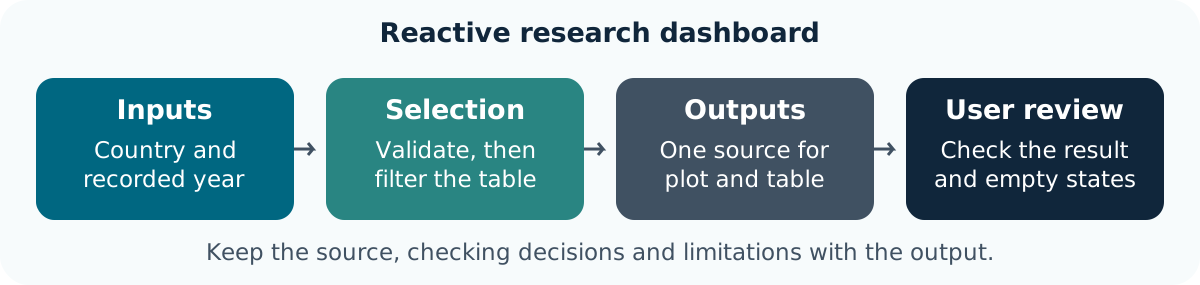
The starter lets a colleague compare recorded life expectancy for chosen countries in one year. It shows the selected records and discloses missingness. The app uses the same analysis.R helper and original CSV as the notebook, so a user can trace the result to a checked calculation.
A dashboard is an interface to an analysis. Define the intended audience, task, units, source and limitations before adding controls. This historical aggregate example does not establish current conditions, individual outcomes or cause.
| Part | Purpose in the starter |
|---|---|
| Input and helper | Read the original CSV and check its keys/types |
ui |
Declare controls and places to display outputs |
server |
Validate inputs, select data and render outputs |
shinyApp(ui, server) |
Create the application from those two parts |
Open the extracted project and run:
Keep that R process running while using the app. Use Stop/Esc in RStudio to stop it. The official Shiny introduction provides a further walkthrough.
Goal: identify the user question and its code path Input: the complete starter app and public CSV Work in pairs: one operates and one checks; swap roles between tasks.
Keep: an input-to-output map. If access fails: annotate the instructor’s displayed input and output with the same decisions and checks.
The app presents a bounded comparison. UI code is not a substitute for input checks, source context or scientific interpretation.
The starter creates a multiple-country selector and a recorded-year selector:
Control IDs connect to input$countries and input$year. Output IDs connect to the corresponding output$... names in the server. Labels help users understand the choice; an identifier connects code. A missing/mismatched output ID can leave a valid server calculation undisplayed.
Use choices derived from the data rather than inventing unavailable years. The two controls describe a country-year selection; they do not ask users to enter arbitrary paths or upload research files.
Goal: diagnose a mismatched UI/server identifier Input: a practice copy of app.R Work in pairs: one operates and one checks; swap roles between tasks.
observations ID changes but the server does not.Keep: the restored app and connection explanation. If access fails: annotate the instructor’s displayed input and output with the same decisions and checks.
A correct calculation can be absent from the interface. Check the ID contract before changing the underlying data.
reactive() defines a calculation whose result can be reused by dependent outputs. In this app, a change to the selected countries or year invalidates the selection; the plot, table and coverage text use the updated result.
This abbreviated excerpt explains the dependency; use the complete starter’s validation when running the app. Calling selected_data() reads the reactive result. Copying separate filter code into every output risks inconsistent selections. See the reactive-flow guide.
Goal: verify that every output uses the same updated selection Input: the restored app and CSV Work in pairs: one operates and one checks; swap roles between tasks.
Keep: two checked selections and an input/output record. If access fails: annotate the instructor’s displayed input and output with the same decisions and checks.
Reactivity repeats the linked calculation. Verify its values and scope; an updating chart alone does not show that the right records were selected.
Save the practice app before continuing.
The complete starter supplies specific messages with validate() and need():
It also validates the year before converting the selector’s text to a numeric value. Converting a GUI choice deliberately is different from silently converting an input data column. The shared helper separately rejects invalid years, unknown identifiers and repeated country-year keys.
An empty choice should display a useful message. A missing source file should fail during loading with the path identified. Missing life-expectancy measurements remain in the table and are counted; the plot uses only observed measurements with an explicit caption. Do not invent a zero or swallow an unexpected error to keep the dashboard looking complete.
Goal: produce a useful state instead of a misleading result Input: the app and its validation code Work in pairs: one operates and one checks; swap roles between tasks.
Keep: an empty-state check and restored result. If access fails: annotate the instructor’s displayed input and output with the same decisions and checks.
Validation explains why a result cannot be displayed. It preserves the distinction between selection, missingness and an actual calculation failure.
The download uses the same reactive selection, a fixed safe filename and an explicit blank representation for missing values. It retains the country/year identifiers and all selected source columns. Rounding in the displayed table is presentation only; the downloaded numeric values retain their precision.
Read the downloaded file and compare keys, row count and measurements with the selected original records. Include the source context when sharing; a CSV alone does not explain units or interpretation.
| Case | Expected check |
|---|---|
| Two recorded countries/year | Plot, table and download agree |
| Another recorded year | All outputs update together |
| No country selected | Clear message; no fabricated result |
| Unknown year/identifier in tests | Validation rejects it |
| Missing source file in a practice copy | A useful loading error |
Goal: check that an exported file represents the same selection Input: the app and a downloaded CSV Work in pairs: one operates and one checks; swap roles between tasks.
Keep: a checked CSV and small test matrix. If access fails: annotate the instructor’s displayed input and output with the same decisions and checks.
Test the data behind the presentation. Formatting and a plausible figure do not establish consistency between views and exports.
A rendered HTML notebook/dashboard can be shared as an artefact. A conventional Shiny application needs a running R process to react to inputs; copying app.R to a static website does not provide that runtime. Use an approved hosting route for a live service and retain the app, helper, dependencies and data permissions with its owner. See Shiny sharing guidance.
Classroom work ends with a checked local app and handover. Publishing, authentication and production operations need a separate deployment plan. The starter reads public historical data and provides no upload facility; do not adapt it to confidential inputs without agreeing the appropriate access and hosting arrangement.
Use the project README and test script to document controls, data coverage, calculations, missingness and failures. Keep the notebook’s qualified interpretation alongside the dashboard so that users understand its limits.
Goal: make the app usable and inspectable by a colleague Input: the notebook, app, helper, checks and source Work in pairs: one operates and one checks; swap roles between tasks.
Keep: a checked app, test matrix and handover record. If access fails: annotate the instructor’s displayed input and output with the same decisions and checks.
The final project connects original inputs, validated functions, figures, narrative and interactive outputs. A working interface still needs an owner and defensible research judgement.
You have a small reactive research dashboard whose inputs, outputs, validation and source can be explained and checked. Keep the complete notebook/app project for reuse and peer review.