flowchart TB
    A["Data Collection"] --> B["Analysis"] --> C["Collaboration"] --> D["Publication & Sharing"]
    D --> A
    style A fill:#E3F2FD,stroke:#1565C0,stroke-width:1px
    style B fill:#E8F5E9,stroke:#2E7D32,stroke-width:1px
    style C fill:#FFF3E0,stroke:#EF6C00,stroke-width:1px
    style D fill:#F3E5F5,stroke:#6A1B9A,stroke-width:1px
Digital Tools
💡 Learning Outcomes
- Navigate core UoN digital ecosystem
- Apply digital best practices in collaboration & file organisation
- Manage your research identity
- Identify essential practices for secure research
❓ Questions
- What are the basic tools I need to conduct research at UoN?
- How do I maintain a consistent online researcher identity?
- What best practices should I undertake to ensure my research is secure?
Introduction to the Digital Skills Programme
Structure & Agenda
- Introduction to the Digital Skills Programme (~10+10 min)
- Institutional Systems for Digital Research (~10+10 min)
- Research Identity and Profiles (~10+10 min)
- Digital Security & Good Practice (~10+10min)
🔧 4 Activities spaced every 10 minutes.
What is the Digital Skills programme
The Digital Skills programme equips researchers with the competencies required for modern, data-driven scholarship.
The programme is not about tools….
It is also about connecting researchers with the people who work with data, including data stewards, software engineers, and information specialists.
Bridging Communities
This programme aims to bridge the gap between disciplinary experts and technical specialists.
💬 Collaboration at every stage of the research process improves the quality of outputs and supports a more open, reproducible culture.
Programme Structure
The programme offers three tiers of learning, from foundational to applied and specialist skills.
| Level | Focus | Example Modules |
|---|---|---|
| Foundation | Core digital research competencies | Essential Digital Skills |
| Intermediate | Theory and collaboration in data science | Python, R, Software Engineering |
| Advanced | Applied analysis and discipline-specific practice | Bioinformatics, HPC, ML/AI |
🧩 Each tier builds practical capability and supports research independence.
Courses
| Course | Description | Duration | Note |
|---|---|---|---|
| Essential Digital Skills – Foundation | Introduces the tools, practices, and principles needed to participate confidently in digital research. | 4× half days | |
| Methods for Data Science – Theoretical | Introduces coding, software, and collaboration practices needed for sustainable research. | 4× half days | |
| Methods for Data Science – Applied Python | Provides practical experience in data analysis and interpretation using Python. | 2 days | Introductory and intermediate |
| Methods for Data Science – Applied R | Provides practical experience in data analysis and interpretation using R. | 2 days | Introductory and intermediate |
| Advanced | — | 1 day? | AI? ML? Bioinformatics? |
Task 1: Digital Skills Reflection
Let’s start by reflecting on your current skills.
❓ Which digital skills (or tools) do you want to learn more about this year?
Institutional Systems for Digital Research
Why Institutional Systems Matter
Digital research depends on connected systems that enable collaboration, safeguard data, and streamline research workflows.
flowchart TB
    A["Researchers"]:::a --> B["Institutional Systems"]:::b --> C["Collaborative Outputs"]:::c
    C --> A
    classDef a fill:#E3F2FD,stroke:#1565C0,stroke-width:1px
    classDef b fill:#E8F5E9,stroke:#2E7D32,stroke-width:1px
    classDef c fill:#FFF3E0,stroke:#EF6C00,stroke-width:1px
🧩 Institutional systems form the backbone of a connected research ecosystem.
UoN’s Digital Ecosystem
At the University of Nottingham, research operates within a digitally integrated environment that connects people, data, and administration.
| System | Primary Role |
|---|---|
| Microsoft 365 | Collaboration and communication |
| SharePoint | Long-term data and document sharing |
| UniCore | Finance, HR, and procurement |
| RIS (Worktribe) | Research lifecycle, funding, outputs |
🏛️ Together these platforms enable secure, collaborative, and transparent research practice.
Microsoft 365: A Platform for Collaboration
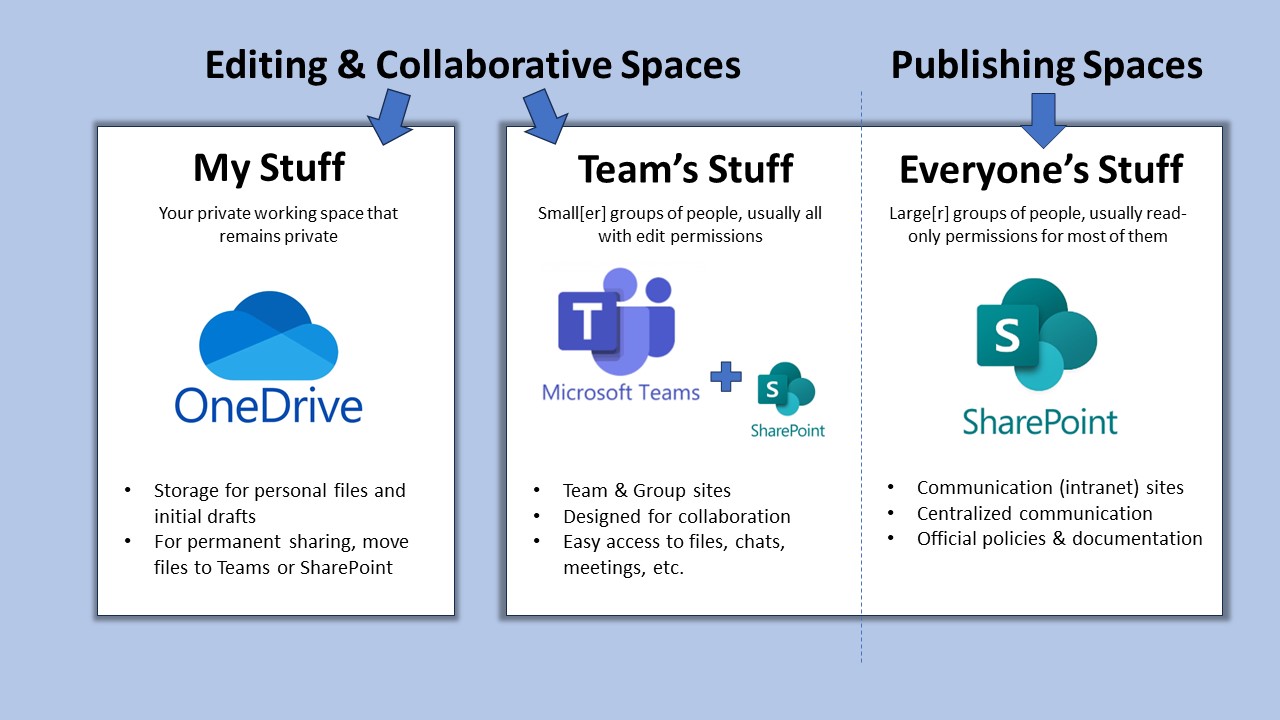
Microsoft 365 supports daily research activity—from communication to data management—within a single, integrated workspace.
| Tool | Function |
|---|---|
| Word & Excel | Writing, data capture, and co-editing |
| OneDrive | Personal cloud storage with versioning |
| Teams | Communication, meetings, shared workspaces |
| SharePoint | Institutional document repositories |
💬 Microsoft 365 is the shared workspace for modern research collaboration.
File Collaboration Best Practice
- Use Teams or SharePoint for shared project files
- Enable autosave and version history in Word or Excel
- Maintain logical folder structures by project phase
- Apply permissions and access control with care
🧠 Good file management is the foundation of digital reproducibility.
UniCore and RIS: Institutional Systems
UniCore and RIS link the operational and administrative sides of research.
| System | Purpose |
|---|---|
| UniCore | Finance, HR, procurement, and resource management |
| RIS (Worktribe) | Project proposals, outputs, and compliance tracking |
🗂️ These systems ensure research activity is visible, auditable, and supported.
UniCore Overview
UniCore is UoN’s enterprise system for managing finance, HR, and procurement.
flowchart TB
    P["Purchasing"]:::a --> E["Expenses"]:::b --> H["HR & Leave Management"]:::c --> R["Research Operations"]:::d
    R --> P
    classDef a fill:#E3F2FD,stroke:#1565C0,stroke-width:1px
    classDef b fill:#E8F5E9,stroke:#2E7D32,stroke-width:1px
    classDef c fill:#FFF3E0,stroke:#EF6C00,stroke-width:1px
    classDef d fill:#F3E5F5,stroke:#6A1B9A,stroke-width:1px
🧭 UniCore underpins the financial and operational side of research at the university.
RIS (Research Information System)
RIS (Worktribe) records, tracks, and reports the full research lifecycle.
| Feature | Purpose |
|---|---|
| Grant Management | Develop and cost funding proposals |
| Outputs Tracking | Record publications and datasets |
| Impact Recording | Capture engagement and REF evidence |
| ORCID Integration | Synchronise researcher identity and outputs |
📚 RIS ensures research activity is captured and connected institutionally.
System Use in Context
| Research Task | Recommended System | Collaboration Benefit |
|---|---|---|
| Co-author a paper | OneDrive / Word | Real-time editing and version control |
| Submit a funding bid | RIS | Shared proposal development and audit trail |
| Claim expenses | UniCore | Secure and traceable reimbursement |
| Share datasets | SharePoint / Teams | Controlled access and persistence |
| Record outputs | RIS + ORCID | Automatic institutional linking |
⚙️ Each platform serves a distinct role in the research ecosystem.
The Broader Vision: Connected Research
By using institutional systems effectively teams build trust and accountability, data remains secure, reusable, and open and researchers can spend more time working on innovation and discovery
flowchart TB
    A["Transparency"]:::a --> B["Trust"]:::b --> C["Collaboration"]:::c --> D["Impact"]:::d
    D --> A
    classDef a fill:#E3F2FD,stroke:#1565C0,stroke-width:1px
    classDef b fill:#E8F5E9,stroke:#2E7D32,stroke-width:1px
    classDef c fill:#FFF3E0,stroke:#EF6C00,stroke-width:1px
    classDef d fill:#F3E5F5,stroke:#6A1B9A,stroke-width:1px
🌍 Digital infrastructure is the connective tissue of modern research.
Task 2: Match Research Tasks to Tools
List the digital tools you would use for each of the following:
- Microsoft Word -> Sharepoint + Teams are ideal for collaborative document editing
- RIS (Worktribe) is used for grant applications and research output tracking
- UniCore handles finance, procurement, HR and expenses
- Microsoft Teams + SharePoint are best for group file access and collaboration
Research Identity & Profiles
Why Research Identity Matters
Your research identity defines how your work is discovered, attributed, and connected across the digital research ecosystem.
flowchart TB
    P["Publications"]:::a --> O["ORCID iD"]:::b --> R["Repositories & Funders"]:::c --> I["Institutional Systems (RIS, HR)"]:::d
    I --> P
    classDef a fill:#E3F2FD,stroke:#1565C0,stroke-width:1px
    classDef b fill:#E8F5E9,stroke:#2E7D32,stroke-width:1px
    classDef c fill:#FFF3E0,stroke:#EF6C00,stroke-width:1px
    classDef d fill:#F3E5F5,stroke:#6A1B9A,stroke-width:1px
🧩 A coherent digital identity ensures your contributions are visible, citable, and connected.
The Importance of Consistency
A consistent identity links your outputs, affiliations, and roles automatically across systems. This approach:
- Guarantees proper attribution and supports efficient collaboration.
- Ensures discoverability across publishers and repositories
- Prevents duplication or misattribution of outputs
- Universal interoperability: used by funders, publishers, and institutions
- Portability: your iD remains active throughout your career
💡 A consistent research identity builds long-term recognition and credibility.
ORCID: A Persistent Digital Identifier
ORCID (Open Researcher and Contributor ID) is the global standard for uniquely identifying researchers across institutions and disciplines.
flowchart LR
    A["Researcher"]:::a --> B["ORCID iD"]:::b --> C["Funders"]:::c
    B --> D["Publishers"]:::d
    B --> E["Repositories"]:::e
    classDef a fill:#E3F2FD,stroke:#1565C0,stroke-width:1px
    classDef b fill:#E8F5E9,stroke:#2E7D32,stroke-width:1px
    classDef c fill:#FFF3E0,stroke:#EF6C00,stroke-width:1px
    classDef d fill:#F3E5F5,stroke:#6A1B9A,stroke-width:1px
    classDef e fill:#E1F5FE,stroke:#0277BD,stroke-width:1px
🧠 Your ORCID iD is your digital fingerprint across the global research ecosystem.
RIS (Research Information System) at UoN
At UoN, RIS (Worktribe) complements your ORCID profile by linking research activity to institutional records.
| Feature | Function |
|---|---|
| Grant Management | Tracks proposals, approvals, and costings |
| Outputs Dashboard | Records publications, datasets, and impacts |
| Compliance | Supports REF and Open Access requirements |
| Integration | Syncs with ORCID and external repositories |
🏛️ RIS ensures your institutional identity mirrors your global research presence.
Managing Your Research Profiles
It is recomended that you:
- Make your ORCID profile public for discoverability
- Merge duplicate Scopus IDs to ensure accuracy =
- Use consistent name and affiliation formats
- Avoid unverified or proprietary metrics
- Audit profiles regularly for correctness
🧭 Managing your identity actively ensures your research remains visible and verifiable.
Task 3: Research Identity Self-Audit
❓ Do you have a ORCID research identity?
Visit Orcid, Log in / sign up
❓ Is your ORCID ID populated with your name, affiliation etc? If not make sure that is complete. - Set your ORCID ID to public (if appropriate)
- You can actually link your RIS and ORCID profiles, but for that you need to be registered to use worktribe. It is recomended that you request access
- Once registered you will be able to link your ORCID and RIS profiles. For more infomation please refer to the RIS training materials.
Digital Security & Good Practice
Why Digital Security Matters
Effective digital research requires vigilance, responsibility, and sound data stewardship to protect not only research, but also collaborators and institutions.
flowchart TB
    A["Trust & Compliance"]:::a --> B["Data Integrity"]:::b --> C["Confidentiality"]:::c --> D["Continuity"]:::d --> E["Collaboration Resilience"]:::e --> A
    classDef a fill:#E3F2FD,stroke:#1565C0,stroke-width:1px
    classDef b fill:#E8F5E9,stroke:#2E7D32,stroke-width:1px
    classDef c fill:#FFF3E0,stroke:#EF6C00,stroke-width:1px
    classDef d fill:#F3E5F5,stroke:#6A1B9A,stroke-width:1px
    classDef e fill:#E1F5FE,stroke:#0277BD,stroke-width:1px
🔒 Digital security is a collective responsibility: protecting data protects discovery.
Passwords & Access Management
Passwords remain the first line of defence against unauthorised access.
Weak or reused passwords are still the most common research vulnerability.
- Use at least 12 characters with a mix of cases, numbers, and symbols
- Create unique passwords for each system
- Never share credentials via email or chat
- Regularly review access permissions for shared platforms
🧠 Strong passwords are simple, low-cost defences against complex risks.
Multi-Factor Authentication (MFA)
MFA adds a crucial verification step beyond a password.
Even if your password is compromised, MFA prevents most unauthorised logins.
flowchart LR
    U["User Login"]:::a --> P["Password"]:::b --> V["Second Factor (App / SMS / Key)"]:::c --> A["Access Granted"]:::d
    classDef a fill:#E3F2FD,stroke:#1565C0,stroke-width:1px
    classDef b fill:#E8F5E9,stroke:#2E7D32,stroke-width:1px
    classDef c fill:#FFF3E0,stroke:#EF6C00,stroke-width:1px
    classDef d fill:#F3E5F5,stroke:#6A1B9A,stroke-width:1px
🔐 Think of MFA as the seatbelt of your digital life—simple, unobtrusive, and essential.
Device & Data Protection
Devices are gateways to institutional data.
Protecting them is vital for maintaining research integrity and trust.
| Action | Purpose |
|---|---|
| Store files on OneDrive or SharePoint | Secure cloud storage with version control |
| Avoid local or personal cloud drives | Prevent data loss and compliance breaches |
| Enable screen locks and encryption | Protect devices if lost or stolen |
| Use separate user profiles on shared machines | Maintain privacy and accountability |
⚙️ Encryption safeguards your work even when devices are compromised.
Secure Remote Access
Remote work expands flexibility but increases risk.
Safe access protects your data wherever you work.
- Always connect through the UoN VPN when off campus
- Avoid public Wi-Fi without VPN protection
- Keep software and systems updated before connecting
- Define secure sharing protocols for collaborators
🌍 A VPN keeps your connection secure—your data stays private, even on public networks.
Data Backup Strategy
Backups prevent irreversible data loss from accidents, failures, or attacks.
Follow the 3-2-1 Rule to ensure resilience.
| Rule | Description |
|---|---|
| 3 Copies | Maintain three versions of your data |
| 2 Media Types | Store on two different media (e.g., cloud and drive) |
| 1 Offsite | Keep one copy offsite or in the cloud |
💾 A backup untested is not a backup—it’s a hypothesis.
Cybersecurity Best Practices
Cybersecurity requires daily habits, not one-off actions.
- Verify sender identity before opening attachments or links
- Avoid personal email for research communication
- Report incidents immediately to UoN IT Security
- Ensure GDPR compliance for international collaborations
🧩 Cybersecurity is continuous awareness—prevention through habit.
Task 4: Digital Security Self-Audit (10 min)
- Identify one way in which you can improve your digital security in the coming week
- Reflect on what was easy/hard to assess, and which barriers exist for better practice
Further Information
UoN Training Resources
- Microsoft 365 Training Resources
- Excel 2016: Basic–Advanced (Online)
- Staff session: Managing your online and RIS research profiles
- Digital Accessibility: The Core Nottingham Accessible Practices
- RIS: Worktribe User Guidance
- UniCore Training Materials
- UoN Information Security: Protect Your Data & Devices
📚 keypoints
- UoN currently uses Microsoft 365 tools support collaborative writing, file sharing, and communication
- UniCore manages research-related administration and RIS manages the research lifecycle.
- A well-maintained research identity increases visibility and attribution of your work.
- Store research data in encrypted, university-backed platforms and ensure your account details are protected
🔦 hints
- Store shared project files in Microsoft Teams rather than OneDrive to ensure long-term access for collaborators.
- Use version history in OneDrive/SharePoint instead of manually renaming file versions.
- Link your ORCID iD to your RIS profile to automate tracking of publications and outputs.
- Practice “security by default”