Loops and Control Flow
Learning Outcomes
- Explain what a
forloop does. - Correctly write
forloops to repeat simple calculations. - Trace changes to a loop variable as the loop runs.
- Trace changes to other variables as they are updated by a
forloop. - Write conditional statements including
if,elif, andelsebranches. - Correctly evaluate expressions containing
andandor.
Questions
- How can I do the same operations on many different values?
- How can my programs do different things based on data values?
Structure & Agenda
- Loop syntax and loop variable behavior (~25 min)
- Iteration tools (
range,enumerate) and worked problems (~25 min)
- Conditional branches with
if,elif, andelse(~25 min)
- Logical operators and practical mini-challenges (~25 min)
🔧 Activities spaced throughout the session
Loop Fundamentals
In this episode, we teach the computer how to repeat actions reliably.
We start with a simple goal: print each value in a list.
Manual Repetition
A list has ordered positions (indices), so we can print items one by one:
Notice the pattern: the action stays the same and only the index changes.
Why Manual Repetition Breaks Down
- Not scalable e.g. for lists with hundreds of elements.
- Hard to maintain e.g. when print output format changes.
- Fragile e.g. when list length changes to become shorter or longer.
We want one approach that works for short and long lists without rewriting code.
Introducing a for Loop
A for loop applies the same action to every item:
This is more concise. It is also more robust for different list lengths:
General Loop Template
A for loop means: for each value in the collection, run the block of code once. Loops make repetition easier by moving “what changes” into a loop variable.
Reading the Loop Diagram
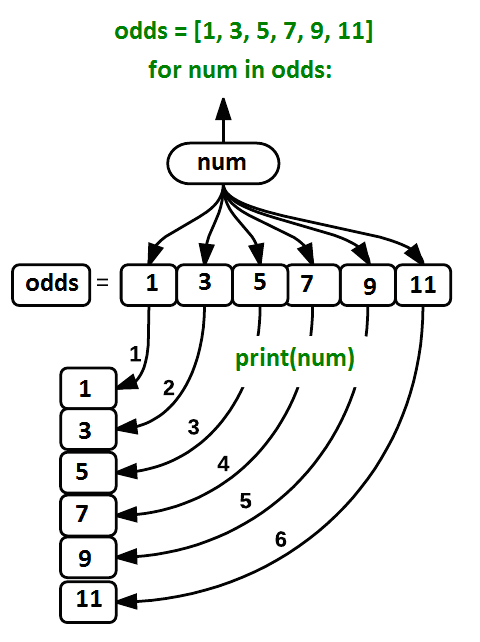
In each cycle, num moves to point at the next value in odds and the loop body runs once.
You can read the loop diagram as: pick a value, run the body of code, and repeat.
Loop Syntax Rules
- The
forline must end with a colon. - The loop body must be indented.
- Indented lines after
forbelong to that loop body.
Correct loop syntax needs both a colon (:) and indentation; missing either raises an error.
Challenge: Understanding Loops
Given the following loop:
How many times is the body of the loop executed? - 3 times - 4 times - 5 times - 6 times
The body of the loop is executed 6 times.
Loop Variable Names
In the example above, the loop variable was given the name num as a mnemonic; it is short for ‘number’. We can choose any name we want for variables. We might just as easily have chosen the name banana for the loop variable, as long as we use the same name when we invoke the variable inside the loop:
It is a good idea to choose variable names that are meaningful, otherwise it would be more difficult to understand what the loop is doing.
Use meaningful names to make it easier to understand and debug your code.
Counting with a Loop
Here’s another loop that repeatedly updates a variable:
It’s worth tracing the execution of this little program step by step. Since there are three names in names, the statement on line 4 will be executed three times:
The first time around,
lengthis zero (the value assigned to it on line 1) andvalueisCurie. The statement adds 1 to the old value oflength, producing 1, and updateslengthto refer to that new value.The next time around,
valueisDarwinandlengthis 1, solengthis updated to be 2.After one more update,
lengthis 3; since there is nothing left innamesfor Python to process, the loop finishes and theprintfunction on line 5 tells us our final answer.
Trace one iteration at a time to verify how each variable changes.
Loop Variable Scope
Note that a loop variable is a variable that is being used to record progress in a loop. It still exists after the loop is over, and we can re-use variables previously defined as loop variables as well:
Counting with len
Note also that finding the length of an object is such a common operation that Python actually has a built-in function to do it called len:
Prefer Built-In Functions
For example, len is much faster than any function we could write ourselves, and much easier to read than a two-line loop; it will also give us the length of many other things that we haven’t met yet, so we should always use it when we can.
Challenge: Summing a List
Write a loop that calculates the sum of elements in a list by adding each element and printing the final value, so [124, 402, 36] prints 562
You can use an accumulator variable that is updated in each iteration.
Note that this would normally be done using the built-in function sum:
Looping Over range
Python has a built-in function called range that generates a sequence of numbers. range can accept 1, 2, or 3 parameters.
- If one parameter is given, i.e.
range(stop), it generates a sequence of that length, starting at zero and incrementing by one. For example,range(3)produces the numbers0, 1, 2. - If two parameters are given, i.e.
range(start, stop), it starts at the first and ends just before the second, incrementing by one. For example,range(2, 5)produces2, 3, 4. - If three parameters are given, i.e.
range(start, stop, step), it starts at the first one, ends just before the second one, and increments by the third one. For example,range(3, 10, 2)produces3, 5, 7, 9.
Challenge: From 1 to N
Using range, write a loop that prints the first 3 natural numbers:
range(1, 4) produces 1, 2, 3. The stop value is not included.
Challenge: Computing Powers With Loops
Exponentiation is built into Python with the ** operator:
Write a loop that calculates the same result as 5 ** 3 using multiplication (and without exponentiation).
Challenge: Computing the Value of a Polynomial
The built-in function enumerate takes a sequence (e.g. a list) and generates a new sequence of the same length. Each element of the new sequence is a pair composed of the index (0, 1, 2,…) and the value from the original sequence:
The code above loops through a_list, assigning the index to idx and the value to val.
enumerate provides both index and value, which fits polynomial calculations.
Here pass means “don’t do anything”. It can be used as a placeholder to prevent errors in empty blocks where code is expected.
Suppose you have encoded a polynomial as a list of coefficients in the following way: the first element is the constant term, the second element is the coefficient of the linear term, the third is the coefficient of the quadratic term, where the polynomial is of the form \(ax^0 + bx^1 + cx^2\).
Write a loop using enumerate(coefs) which computes the value y of any polynomial, given x and coefs.
Conditional Logic
In this lesson, we’ll learn how to write code that runs only when certain conditions are true.
We can ask Python to take different actions, depending on a condition, with an if / else statement:
Branch Execution Flow
The second line of this code uses the keyword if to tell Python that we want to make a choice. If the test that follows the if statement is true, the body of the if (i.e., the set of lines indented underneath it) is executed, and “greater” is printed. If the test is false, the body of the else is executed instead, and “not greater” is printed. Only one or the other is ever executed before continuing on with program execution to print “done”:

if without else
Conditional statements don’t have to include an else. If there isn’t one, Python simply does nothing if the test is false:
elif
We can also chain several tests together using elif, which is short for “else if”. The following Python code uses elif to print the sign of a number.
Comparison Operators
Note that to test for equality we use a double equals sign == rather than a single equals sign = which is used to assign values.
Along with the > and == operators we have already used for comparing values in our conditionals, there are a few more options to know about:
>: greater than<: less than==: equal to!=: does not equal>=: greater than or equal to<=: less than or equal to
We can also combine tests using the logical operator keywords and and or. Using the and operator only produces a True result if both parts are true:
Using the or operator produces a True result if at least one part is true:
Boolean Values
True and False are special keywords in Python which represent boolean truth values and are of type bool. A statement such as 1 > 0 returns the value True, while -1 > 0 returns the value False.
Every if condition must evaluate to either True or False.
Challenge: How Many Paths?
Consider this code:
Which of the following would be printed if you were to run this code? Why did you pick this answer?
- A
- B
- C
- B and C
C gets printed because the first two conditions, 4 > 5 and 4 == 5, are not true, but 4 < 5 is true. In this case only one of these conditions can be true at a time, but in other scenarios multiple elif conditions could be met. In these scenarios only the action associated with the first true elif condition will occur, starting from the top of the conditional section. 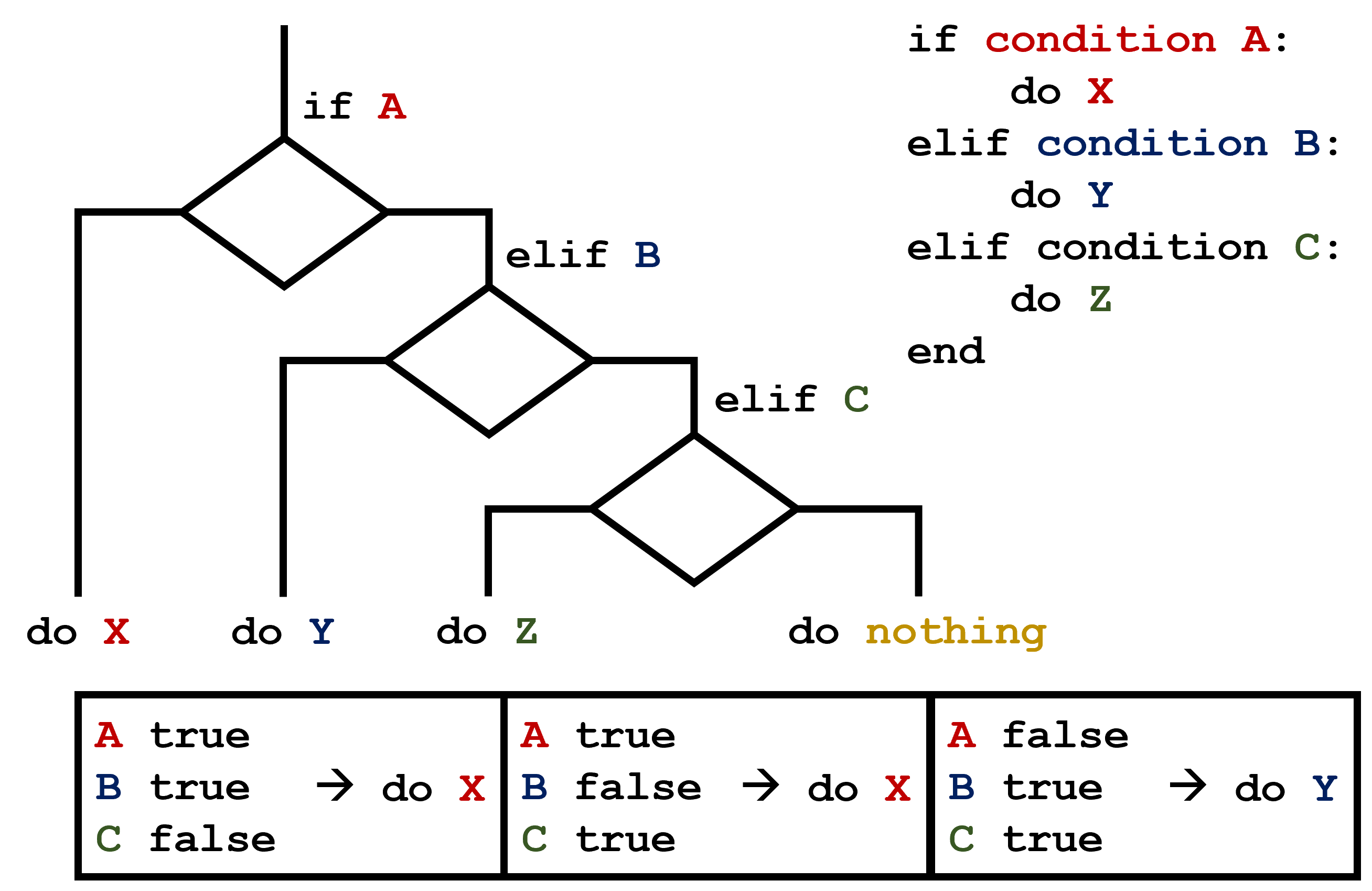 This contrasts with the case of multiple
 if statements, where every action can occur as long as their condition is met. 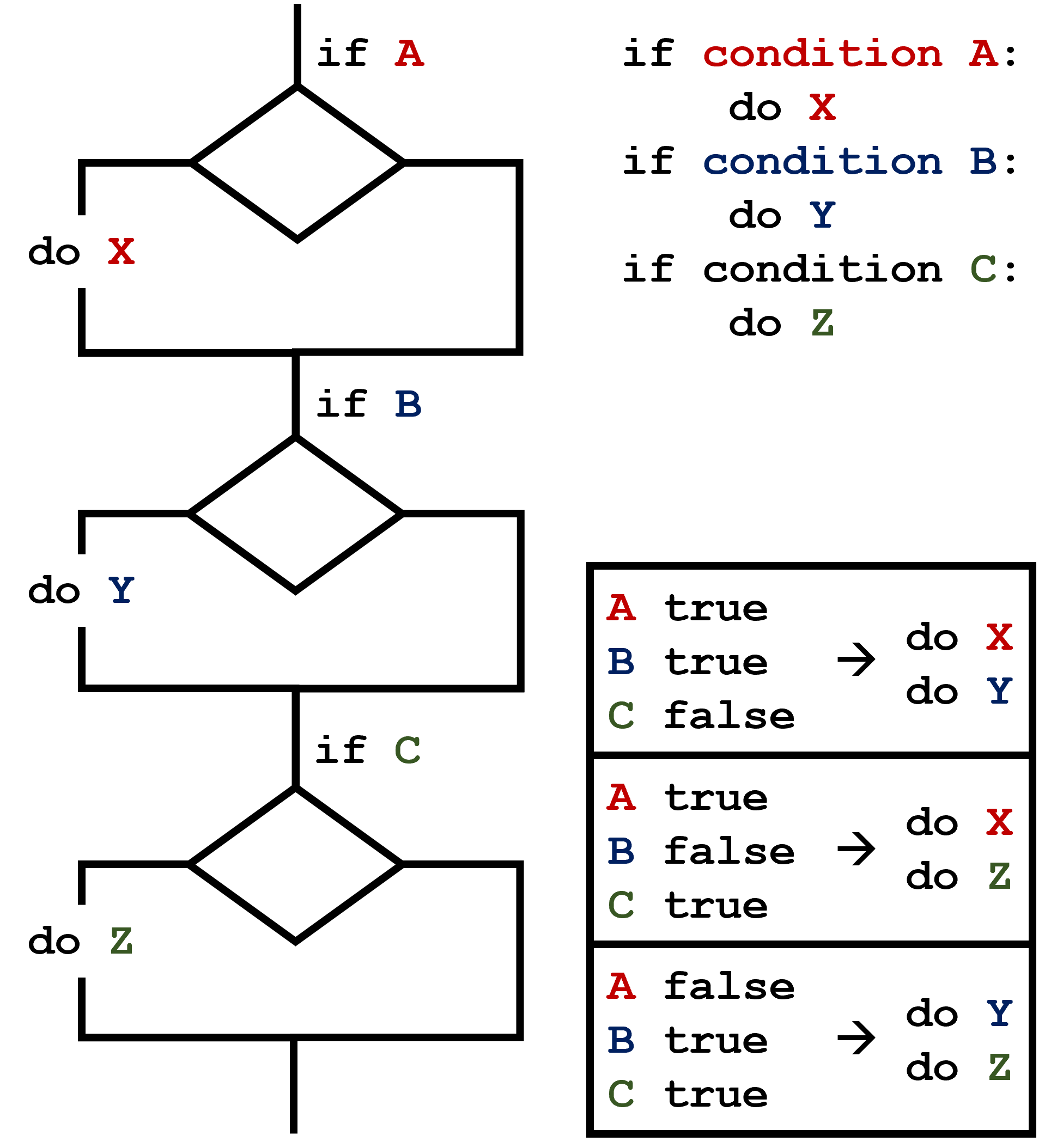
Challenge: What Is Truth?
True and False booleans are not the only values in Python that are true and false. In fact, any value can be used in an if or elif. After reading and running the code below, explain what the rule is for which values are considered true and which are considered false.
Challenge: That’s Not Not What I Meant
Sometimes it is useful to check whether some condition is not true. The Boolean operator not can do this explicitly. After reading and running the code below, write some if statements that use not to test the rule that you formulated in the previous challenge.
Challenge: Close Enough
Write some conditions that print True if the variable a is within 10% of the variable b and False otherwise.
Compare your implementation with your partner’s: do you get the same answer for all possible pairs of numbers?
There is a built-in function abs that returns the absolute value of a number:
Alternative Solution:
This works because the Booleans True and False have string representations which can be printed.
Printing the boolean directly avoids the extra if/else output code.
Challenge: In-Place Operators
Python (and most other languages in the C family) provides in-place operators that work like this:
Write some code that sums the positive and negative numbers in a list separately, using in-place operators.
Do you think the result is more or less readable than writing the same without in-place operators?
Challenge: Sorting a List Into Buckets
In our data folder, large data sets are stored in files whose names start with “inflammation-” and small data sets are stored in files whose names start with “small-”. We also have some other files that we do not care about at this point. We’d like to break all these files into three lists called large_files, small_files, and other_files, respectively.
Add code to the template below to do this. Note that the string method startswith returns True if and only if the string it is called on starts with the string passed as an argument, that is:
Because startswith is case sensitive,
Use the following Python code as your starting point:
Your solution should:
- loop over the names of the files
- figure out which group each filename belongs in
- append the filename to that list
In the end the three lists should be:
Challenge: Counting Vowels
- Write a loop that counts the number of vowels in a character string.
- Test it on a few individual words and full sentences.
- Once you are done, compare your solution to your neighbor’s. Did you make the same decisions about how to handle the letter ‘y’ (which some people think is a vowel, and some do not)?
Further Information
📚 Keypoints
- Use
for variable in sequenceto process the elements of a sequence one at a time. - The body of a
forloop must be indented. - Use
len(thing)to determine the length of something that contains other values. - Use
if conditionto start a conditional statement,elif conditionto provide additional tests, andelseto provide a default. - The bodies of the branches of conditional statements must be indented.
- Use
==to test for equality. X and Yis only true if bothXandYare true.X or Yis true if eitherXorY, or both, are true.- Zero, the empty string, and the empty list are considered false; all other numbers, strings, and lists are considered true.
TrueandFalserepresent truth values.
🔦 Hints
- Trace one loop iteration at a time before generalizing behavior.
- Test both
TrueandFalsepaths for every conditional. - Use small sample lists first, then scale up once logic is correct.
Module Summary
This module introduces the control-flow tools that make Python programs dynamic: loops for repetition and conditionals for decision-making. Learners practice translating repetitive tasks into clear, maintainable logic.
Additional Learning
The concepts in this module connect directly to practical data handling and exploration in Python.
| Submodule | Python Connection | Why It Matters |
|---|---|---|
for Loops and Iteration |
The for statement |
Loops remove duplication and scale operations across datasets. |
| Numeric Ranges | range |
range is central for controlled numeric iteration. |
| Conditional Logic | Boolean operations and comparisons | Branching lets code respond safely to changing data. |