| Block | Teaching | Activity | Output to keep |
|---|---|---|---|
| Notebook purpose and structure | 10 min | 5 min | An evidence map |
| Code and execution | 10 min | 5 min | A fresh render |
| Tables and figures | 10 min | 5 min | A checked result |
| Break | — | 10 min break | — |
| Parameters and inline values | 10 min | 5 min | An updated question |
| Validation and failures | 10 min | 5 min | A recorded failure check |
| Sharing and peer review | 10 min | 5 min | A reproducible notebook handover |
| Total | 60 min | 30 min | 100 min including the break |
This is lesson 7 of eight. Each five-minute activity includes a room response and debrief. Save work before the ten-minute break; use a practice copy and keep original inputs unchanged.
Complete Visualisation. Download and extract the shared project, open it as the RStudio project and prepare Quarto using Setup. The supplied report.qmd is a complete working notebook, not an empty template. Run R commands in that local project; the code excerpts below show notebook/source structure and do not run a second notebook inside this lesson.
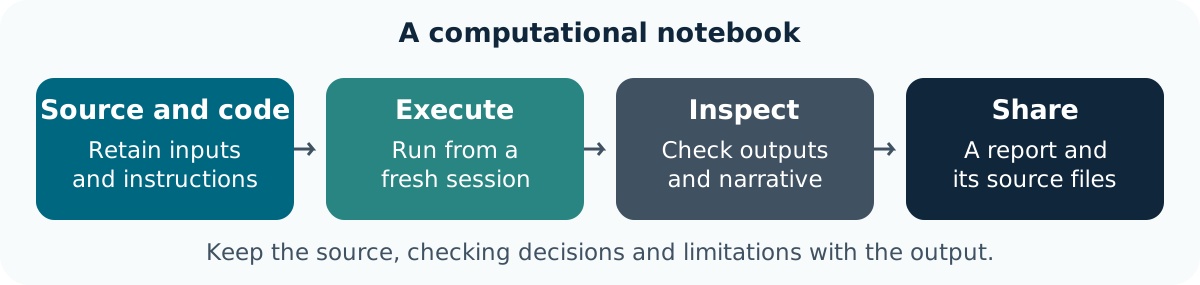
A computational notebook records the question, input, code, outputs, interpretation and changes made. A saved rendered page shows a result; the source notebook and its supporting files explain how that result was made.
The course uses Quarto .qmd documents in RStudio. Markdown supplies narrative and structure; executable R cells supply computations. Keep reading notes, exploratory decisions and final interpretations distinguishable. See the official computational-document tutorial.
The project includes:
| File | Role |
|---|---|
data/gapminder_data.csv |
Original historical country-year input |
analysis.R |
Shared validation, selection, summary and plotting functions |
report.qmd |
Question, parameters, code, results and interpretation |
tests.R |
Known-value, identity, failure and reactive checks |
app.R |
The dashboard developed in lesson 8 |
The shared functions preserve source records. The mean is unweighted across selected observed countries; the report discloses that choice and missing-value counts.
Goal: identify how a notebook supports a statement Input: the supplied report.qmd and input file Work in pairs: one operates and one checks; swap roles between tasks.
Keep: an evidence map from claim to source and calculation. If access fails: annotate the instructor’s displayed input and output with the same decisions and checks.
The notebook connects narrative and computation. The source files and explicit selection are needed to reproduce and inspect the result.
Open report.qmd in RStudio. Its Render button runs the document’s saved computation. Running a cell interactively is useful during development; rendering the whole document checks whether saved steps establish all required objects.
The report begins with this complete setup, shown as an excerpt:
Open the extracted project folder and render from it. The CSV path is relative to that project. Keep a saved source file; do not depend on an object left in the console from a previous session.
The notebook keeps computation errors visible (error: false stops rendering). A failed render is information about the workflow, not a reason to paste yesterday’s output into a new report.
Goal: expose dependence on unsaved interactive work Input: the unchanged project and report Work in pairs: one operates and one checks; swap roles between tasks.
analysis.R and the CSV.Keep: the rendered HTML and a fresh-session check. If access fails: annotate the instructor’s displayed input and output with the same decisions and checks.
A successful render establishes saved execution in that environment. Check the resulting selection and interpretation separately.
The report renders the selected records, a summary and a figure from the same selection object. It uses a figure caption, alternative text and a cross-reference so that a reader can locate the item being discussed.
The source contains the following real cell options:
#| label: fig-comparison
#| fig-cap: "Life expectancy for the selected historical country-year observations."
#| fig-alt: "A column chart comparing the selected countries' recorded life expectancy in years. Missing values, if present, are disclosed and excluded from the chart only."
make_comparison(selection)
A caption explains scope and context; alternative text describes the visual relationship. Check one plotted value against the selected record and then the original CSV. Keep the code used to produce the figure, not just the exported image.
The source is historical aggregate data. The displayed comparison cannot establish present-day conditions, individual outcomes or cause. The report’s summary explicitly identifies observed/missing counts and its unweighted mean.
Goal: check that table, figure and explanation refer to the same data Input: the rendered report and original CSV Work in pairs: one operates and one checks; swap roles between tasks.
Keep: a checked result and revised narrative. If access fails: annotate the instructor’s displayed input and output with the same decisions and checks.
Consistent outputs still need a defensible interpretation. Figure numbering and a polished layout do not establish evidential support.
Save the notebook and review note before continuing.
The notebook’s header declares countries and one recorded year:
Change the year to another recorded year, such as 1952, and re-render. The selected records, figure, summary and inline year should all change together. Read the parameter guidance for additional interfaces.
The starter uses embed-resources: true for HTML snapshots. Each saved HTML report keeps its own figure, so a later parameter run cannot replace the image referenced by an earlier report. This snapshot still needs the notebook, helper and input files for a fresh computation.
The source also uses inline R expressions for row counts and the selected year. Those are computed from the current selection instead of manually copied numbers. Do not replace them with prose that becomes stale after changing a parameter.
Goal: keep every displayed output aligned with a parameter Input: the report and a recorded year such as 1952 Work in pairs: one operates and one checks; swap roles between tasks.
Keep: the revised report and parameter record. If access fails: annotate the instructor’s displayed input and output with the same decisions and checks.
A parameter makes a deliberate choice visible. It does not choose a scientifically appropriate comparison on the researcher’s behalf.
The helper refuses years absent from the source and unknown country identifiers. Try an invalid year only in a practice copy; read the error, restore a recorded value and render again. Do not substitute another year silently.
The project has a repeatable check script:
It checks keys, unchanged source objects, known selections, empty/invalid inputs, missing-value counts, plotted values and the app’s reactive selection. Read what those checks establish; passing them is not proof of every possible scientific claim.
A missing input file, an invalid parameter and an observed measurement that is missing require different responses. Record which failure occurred and the correction, keeping the original source unchanged.
Goal: diagnose a parameter problem without masking it Input: a practice report with year changed to 2012 Work in pairs: one operates and one checks; swap roles between tasks.
Keep: the error, correction and successful recheck. If access fails: annotate the instructor’s displayed input and output with the same decisions and checks.
An explicit failure is preferable to a confident report for an unsupported selection. The correction must remain a recorded research decision.
Share the notebook, helper, permitted input, checks and README as a coherent project. The report records sessionInfo() to identify the R/package environment actually used. A rendered HTML file is useful for readers; it does not contain every file needed to rerun the source.
For a real project, check what can be shared and keep sensitive inputs in their approved location. Use a small public or fictional example for classroom exchange. Git and a package-lock workflow are optional extensions; do not add them without explaining the team’s process.
Ask a partner to find the question, parameter values, input, known check, uncertainty and instructions to render. If they cannot rerun locally, they can still identify missing information by inspecting the files.
Goal: make the project understandable to another researcher Input: the report, code, checks and permitted source Work in pairs: one operates and one checks; swap roles between tasks.
Keep: a reviewed notebook and handover note. If access fails: annotate the instructor’s displayed input and output with the same decisions and checks.
Reproducibility includes sources, decisions and environment context. Keep uncertainty visible rather than treating a reproducible calculation as an automatically valid interpretation.
You have a computational research notebook whose question, code, outputs and limits can be inspected and rerun. Next, expose the same checked analysis through an interactive dashboard.