Applied AI for Research
💡 Learning Outcomes
By the end of this module, learners will be able to:
- Choose an AI approach that fits a research task.
- Turn a request into a clear workflow with labelled sources.
- Judge where AI may help with reviews, study design, analysis, writing, automation and grants.
❓ Questions
- What could we be asking AI to do, and what evidence can it actually see?
- How do we check the answer and show how it was produced?
- Which decisions still require a researcher’s judgement?
Outline
This workshop builds on Introduction to AI for Research and Prompting for Research. It assumes familiarity with basic prompting and source checking; no programming background is required.
| Block | Approximate time |
|---|---|
| Opening and framing | 10 min |
| Choosing tools and approaches | 10 min |
| Building inspectable workflows | 10 min |
| Working across the research lifecycle | 10 min |
| Literature reviews | 20 min |
| Qualitative and quantitative analysis | 20 min |
| Agents and research automation | 10 min |
| Grant applications | 10 min |
| Research integrity, action and close | 20 min |
The Current AI Landscape for Academic Research
Three Layers of an AI-Assisted Task
- A model is the underlying AI that generates or interprets content.
- A tool is the product around it: the interface, files, search or code execution.
- A workflow is the plan that connects the tool to a research task, human checks and a decision.
The same model can behave differently when the available sources, tools or instructions change.
🧭 Start with the task, the permitted inputs and the checks you can perform.
From Model to Research Workflow
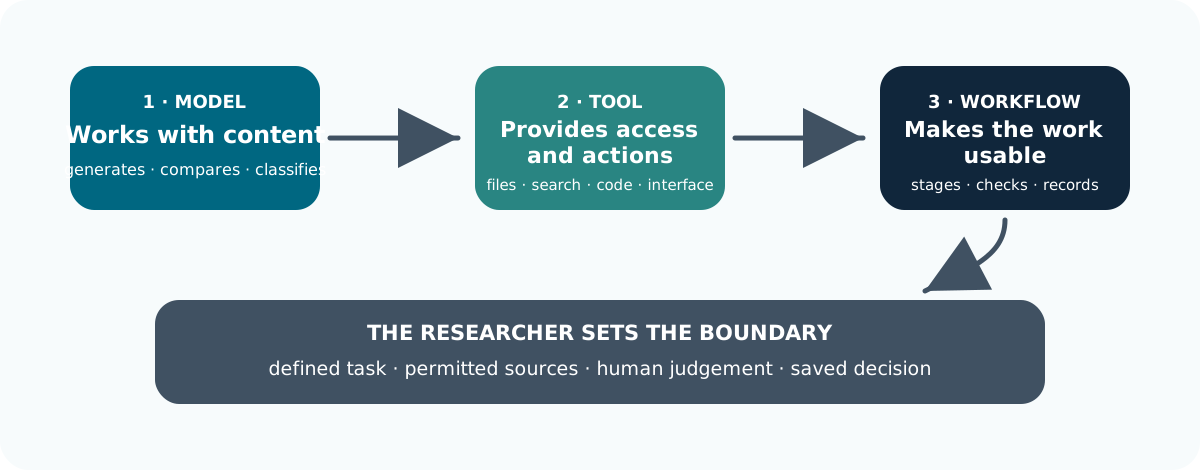
A Product Is More Than Its Model
The product name tells you very little about whether they are sutible to use for research processes.
ChatGPT, Claude, Gemini and Microsoft Copilot Chat are products or interfaces. A product may offer several models, choose one automatically and add abilities such as web search, document reading or code execution.
GPT, Claude, Gemini and Mistral are families of models. Where the information is visible, record both the product or service and the model and version.
Match the Tool to the Task: These are starting points, not performance rankings.
Tools
| Tool Function | Research Task | Possible Starting Point |
|---|---|---|
| Discovery and search | Refine a question or critique a draft | A general assistant such as Claude, Gemini or an approved Copilot service |
| Discovery and search | Explore a topic or public guidance | Web search with an assistant such as Perplexity |
| Discovery and search | Find papers from a research question | Elicit or Consensus, alongside disciplinary databases |
| Citation connections | Explore related papers | ResearchRabbit or Litmaps |
| Citation connections | Examine how a paper is cited | Scite |
| Document evidence | Ask across a selected collection | Google’s source notebooks, known as NotebookLM and now described as Gemini Notebook; approved document assistants |
| Document evidence | Extract fields across papers | Elicit’s extraction workflows or a structured prompt over approved PDFs |
| Data and code | Work with interview text | An approved assistant or MAXQDA AI Assist |
| Data and code | Develop code and visualisations | GitHub Copilot or an approved coding assistant |
Choose Tools based on capabilities
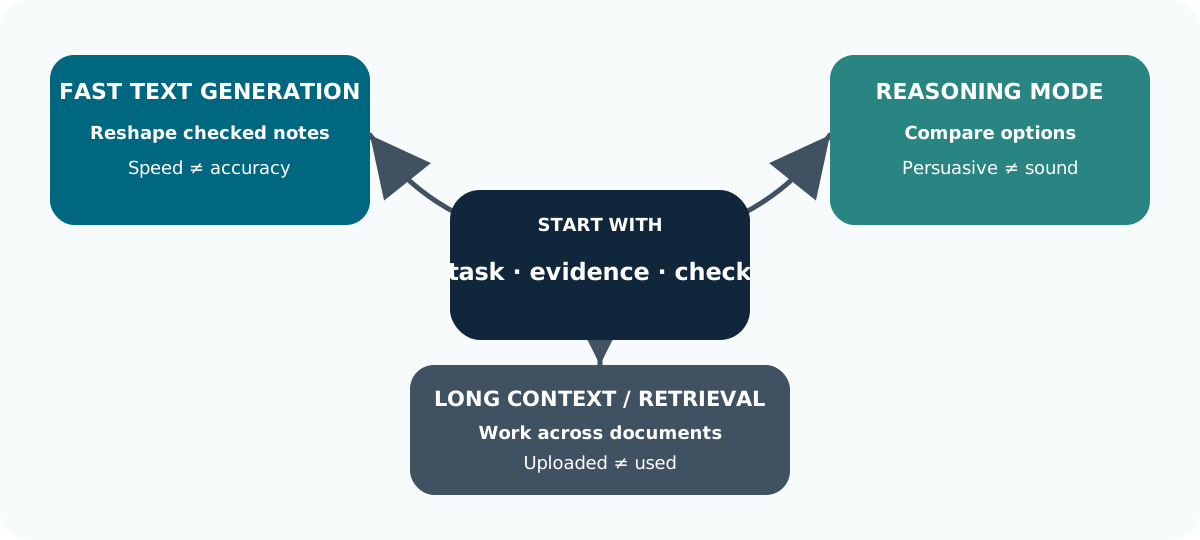
Dont pick tools just because they sound cool!
Verify the Tool is Appropriate for the Task
Different tools and models have different strengths. Do not assume a capability: verify it.
| Check | What to verify |
|---|---|
| Capability | Is the tool good at the task: reasoning, coding, images or long documents? |
| Functionality | Can it actually perform the task you need? |
| Output | Does the result match the source, data or calculation? |
| Data handling | Where is data processed, stored or logged? |
| Use conditions | Are the licence and external connections appropriate? |
Choose the tool for the task, then verify the result.
A Small Evaluation Beats a General AI Rankings
Compare candidate tools on the same permitted material. Include a straightforward case, an ambiguous case and a question the sources cannot answer.
- Can you trace claims to source passages or executed calculations?
- Does the tool preserve uncertainty, contrary evidence and missing values?
- Can you export the inputs, prompts, outputs and corrections?
- What are the total time, cost and checking effort?
🔎 Agreement between two AI tools is a reason to check the evidence, not independent confirmation of a finding.
Task 1: Choose an Approach
When evaluating which tool is best for a sepecific task what approach would you use?
Example; For the following; What is the single check you would insist on?
- Find newer papers related to a known article.
- Compare a concept across three approved PDFs.
- Newer related papers: Check how good coverage and the retrieved records?
- Three PDFs: Check source locations and cross-document attribution?
The brand name is secondary to the evidence it can access and the checks you can perform.
Using AI Effectively in Research Workflows
Start with the Research Task
Before using AI, be clear about what you are trying to do.
- Why? Prepare for a supervision meeting.
- What? Explore whether peer writing groups help researchers write regularly.
- Focus on? Writing time, confidence and completed work.
A clear starting point helps AI stay focused on the question you actually want to answer.
Set the Evidence Rules
Be clear about what the AI can use and what a good result should include.
| Include | Example |
|---|---|
| Sources | Use only the supplied material |
| Output | Show where each claim came from |
| Limits | Do not invent details or overstate conclusions |
| Check | Verify important claims yourself |
Keep your instructions separate from the material being analysed.
Provide Documents
Give the AI the right material, and make sure it can actually find what you want.
- Check it has permission to use each document in the selected service.
- Give each source a stable ID, title, date and version.
- Ask which sources the tool can access and which pages or tables it cannot read.
- Test a small extraction against the original before expanding the task.
Dont assume an AI tool can interpet every bit of information you give it!
Understand How Documents Reach the Model
Many document tools first search the uploaded material for relevant passages and then give those to the model.
This is often called retrieval-augmented generation (RAG).
It can make answers easier to trace, but the search step can miss important evidence.
📄 Ask for section headings, printed page numbers or passage locations. Mark the location as unavailable when the tool cannot provide it reliably. Being able to accept a long document does not mean the tool gives equal attention to every page.
Compare First, Then Combine
For comparisons across many papers:
- extract every paper into the same schema
- check individual rows against the papers
- only then ask for a cross-paper synthesis
When a conversation becomes long or changes direction, you are often better starting a new session with the current sources.
Work in Visible Stages
Break down the process into its components
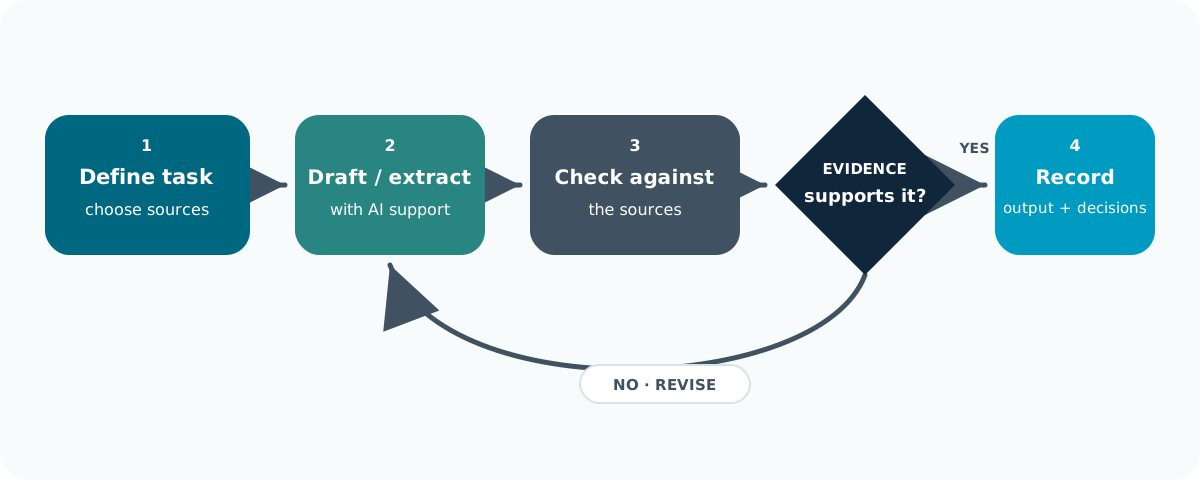
Dont try to do everything in one prompt.
Verification Is Still Your Job
You can ask an AI assistant to:
- Flag assumptions
- Spot unanswered questions
- Identify other possible interpretations.
But you need to check these points yourself against the sources and method.
Asking a real life research assistant to approve their own answer is not independent verification. The same goes for AI.
An example Reusable Research Prompt
Task: Compare what sources say about peer writing groups.

Context: I am preparing a research design discussion, not claiming an effect.

Sources: Use only the labelled teaching extracts supplied below.

Process:

First list the sources you can access and any missing information.

Then produce one row per source with: source ID; design; participants;
outcome or concept; finding;source location; limitation; question requiring human review.

Distinguish reported findings from your interpretation.

Use "not reported" for missing details. Do not invent references or values.
Do not combine different outcomes into a single claim of effectiveness.
Finish with disagreements and uncertainties for me to check.
Task 2: From Request to Workflow
Consider the prompt “Read these papers and tell me what my PhD should study.”
What do you think is the single most important change that you could make to improve this?
A defensible workflow would define:
- labelled sources and a structured extraction
- comparison criteria and source locations
- handling for missing or conflicting evidence
- a researcher checkpoint before any proposed question becomes a decision
The AI can organise possibilities. It cannot decide what is novel, worthwhile and feasible.
AI Across the Research Lifecycle
Synthesize Ideas
AI can help bring together observations, concepts and existing theory to suggest possible explanations.
Example: Writing becomes more regular during a writing group.
Possible explanations include protected time, accountability, confidence or peer support.
🧭 These are ideas to investigate, not findings.
Consider Alternative Explanations
Lets start with a theoretical project that is studying the affects of study groups on writing time.
They observe that after a 6 week period of study group meetings, people tended to write more.
Why might this happen?
The writing group creates protected time.
What else could explain it?
eadlines, supervision, motivation or workload.
The same observation can often be explained in several different ways.
Build a Theoretical Explanation
Normally a resescher would build a theory to test how or why different concepts might be related.
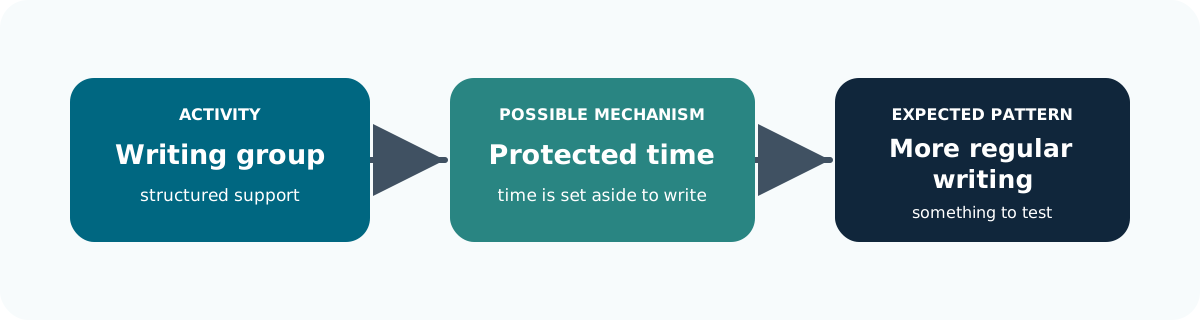
Other factors may influence that relationship, such as motivation, workload or caring responsibilities: A plausible explanation is still something to test.
Turn Theory into Predictions
A theory becomes more useful when it leads to something that could be observed.
| Proposed explanation | What might we expect? |
|---|---|
| Protected time matters | Writing becomes more regular when sessions occur |
| Accountability matters | Peer contact influences drive to write |
Explanation should only be made into prediction based on evidence
Challenge the Explanation
AI can help expose weaknesses before you commit to an idea.
It can help you explore:
- What assumptions am I making?
- What important factors are missing?
- What else could explain the observation?
- What evidence would contradict my explanation?
📝 You can actually ask AI to challenge the idea, not just support it.
Compare Ideas with Evidence
Once you have possible explanations, the normal approach is to compare them against the evidence.
Does the evidence support one or more of our explanations?
Does anything contradict some of them?
What evidence is still missing?
Keep evidence, researcher interpretation and AI suggestions as separate components in you work.
Validate the Theory
AI can help generate and challenge explanations, but it cannot establish that they are correct.
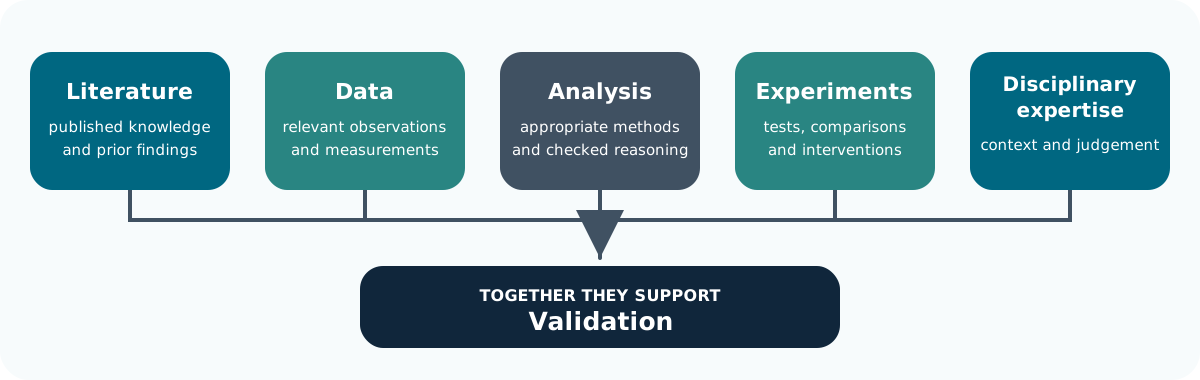
Agreement between several AI systems is not independent evidence.
🔎 The important question is whether the evidence supports the explanation.
Task 3: Match the Claim to the Evidence
Below are a few example of why writing might become more of a regular research task:
- protected time
- social accountability
- increased confidence
Name one alternative explanation and one piece of evidence that could help distinguish between them.
AI response (Codex GPT-5.6 Sol):
| Explanation | Alternative | Useful evidence |
|---|---|---|
| Protected time | Approaching deadline | Writing patterns inside and outside scheduled sessions |
| Accountability | Existing motivation | Attendance, prior writing habits and engagement |
| Confidence | Supervisory support | Changes in confidence alongside other sources of support |
The take home is that AI can generate competing explanations. The evidence determines which remain plausible.
AI for Literature Reviews
What are you reviewing?
An early exploration, a narrative review and a systematic review are different kinds of work.
Decide the purpose, question and method before choosing a tool.
For a systematic or scoping review, work with an information specialist where possible.
Set the rules for which studies count, where you will search, how records will be selected and what information will be extracted.
Resources like PRISMA 2020 help teams plan out how they report this work transparently.
“Deep Research” Is Not a Review Method
An automatically generated “deep research” report can help you get oriented.
But the “deep research” label does not mean that:
- The search can be repeated
- The coverage is complete
- The result is a systematic review
What you need to be asking yourself when using AI for review is: Could another researcher understand what was searched, selected, extracted and checked?
A Review Needs a Visible Trail
Break it down into its components:
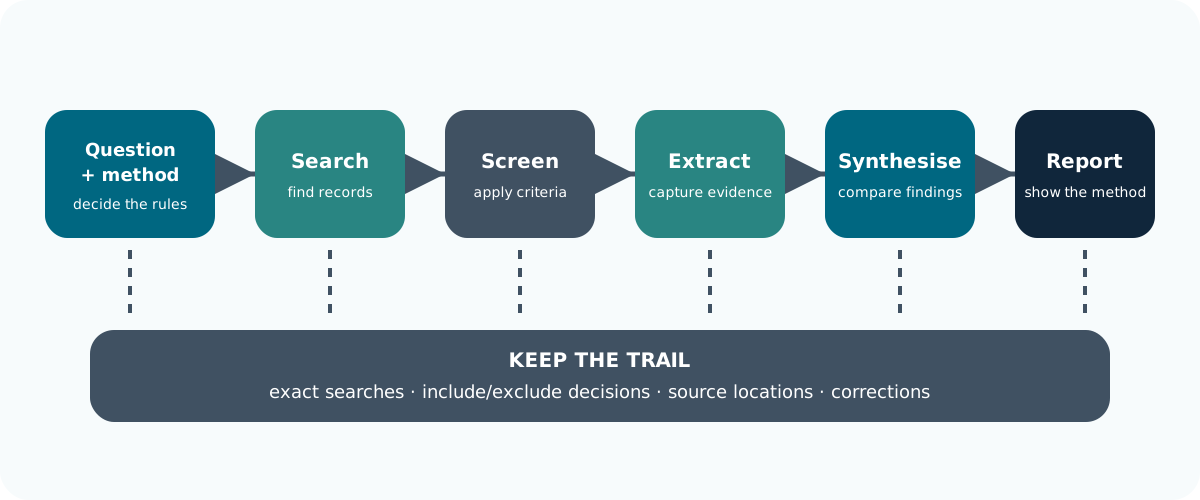
Build a Search You Can Report
AI can help build a search, but you still need a clear method and a record of what you did.
- Break the question into its main ideas.
- List synonyms and database subject headings.
- Search suitable databases such as PubMed, Scopus or Web of Science.
🧭 Keep the exact search terms, database, date and filters used.
Extend and Record the Search
Use other routes to find papers that your first search may have missed.
| Route | What to do |
|---|---|
| AI-assisted discovery | Explore extra terms and candidate papers |
| Citation searching | Follow references backwards and citations forwards |
| Reference management | Export records and check for duplicates |
ResearchRabbit and Litmaps can help explore connections between papers.
Test Screening Suggestions on Difficult Cases
Test AI on the papers that are hardest to classify, not just the obvious ones.
- Define the rules for including and excluding records before screening.
- Test AI suggestions against a set already reviewed by people, including borderline cases and relevant studies that are easy to miss.
- Inspect excluded records as well as included ones: a polished summary cannot reveal an important paper that was wrongly removed.
Document how automation was used and validated. The PRISMA expanded checklist addresses reporting automation in selection and data collection.
Keep the source documents and the Decision Distinct
For each reference:
- Keep a stable ID, the reference details and whether you have the full text, only the abstract or only part of the paper.
- Check supplements, tables, corrections and retractions where relevant.
- Keep the decision to include a paper separate from what you extract and how you interpret it.
Follow the review protocol’s requirements for human review and resolving disagreements.
Evidence Matrix: Identity and Context
Use a structured evidence matrix, Do not let AI fill blanks with plausible values.
| Field | What to record |
|---|---|
| Identity | Paper ID, study ID, citation/DOI and source version |
| Design and setting | Method, population, recruitment, context and timing |
| Concepts and outcomes | What was studied, how it was measured, units and time points |
| Findings | Extracted result, uncertainty and the exact supporting location |
| Limitations | Reported limitations and your separate appraisal |
| Verification | Checked by whom, corrections and unresolved questions |
From Extraction to Synthesis
Once you have collated the evidence, organise the synthesis around the research questions, themes, theories or methods.
A useful review structure could be:
- Question, scope and rationale.
- Search, selection and appraisal approach.
- Characteristics of the included evidence.
- Synthesis of patterns, differences and competing explanations.
- Limitations of the evidence and review process.
- Implications and carefully bounded research gaps.
The aim is to turn the collected evidence into a clear, structured account of what is known, uncertain or still missing.
Keep Claims Attached to Studies
One way to keep claims attached is to ask AI to:
- Draft an outline from the checked evidence table and attach paper IDs to each proposed claim.
- Write and revise with the actual papers open.
Do not treat AI generated counts of “positive” papers as proof: study quality, overlapping samples, uncertainty and whether studies are comparable all matter.
Fictional Evidence
AI can absolutly overstate evidence to make semi-fictious claims;
| Source | What it found | Important limitation |
|---|---|---|
| A | Confidence increased during a six-week writing group | No comparison group; writing output not measured |
| B | Participants valued protected time and encouragement | Only attendees were interviewed |
| C | Attendees reported more weekly writing time | Other factors such as motivation or workload were not accounted for |
The studies may point in a similar direction, but they measure different things and do not prove the same claim.
Task 4: Challenge the Synthesis
Challenge this conclusion:
“Three studies prove that writing groups increased productivity, so universities should require attendance.”
Which single word least defensible? Why?
“Prove”
- A measures confidence without a comparator; B reports experiences; C reports an unadjusted association.
- The extracts do not establish a causal effect on productivity.
AI for Qualitative and Quantitative Data Analysis
Start with the Research Question
AI can help organise data, suggest interpretations and write code. But first decide:
- What are you trying to find out?
- What data do you have?
- What method is appropriate?
🧭 Choose the method because it fits the research question — not because an AI tool can do it.
Protect Your Data
Before using AI, check what data you are sharing and where it is going.
- Keep the original data unchanged and work on a copy.
- Be careful with transcripts, prompts, previews and error messages.
- Use fake or simplified data when real data is not needed.
🔒 Only share the minimum data needed for the task.
Qualitative Analysis
AI can help with some of the early, repetitive work and also help organise patterns and compare different parts of the dataset.
| Stage | AI can help with | You still need to |
|---|---|---|
| Transcription | Draft text and flag unclear sections | Check it against the recording |
| Reading the data | Find relevant passages and summarise sections | Read the full material yourself |
| Coding | Suggest labels or apply an existing codebook | Check that each code fits the text |
| Developing themes | Compare patterns and find contrasting examples | Decide what the patterns mean |
| Reporting | Organise extracts and challenge your explanation | Preserve context, anonymity and meaning |
MAXQDA AI Assist, for example, offers coding support, summaries and questions over text.
Quantitative Analysis
Before asking AI to analyse data, explain what each variable means, how the data were collected and what you want to test.
Start by checking the dataset itself:
- Names, data types, IDs and units.
- Missing values, duplicates and obvious problems.
- Whether variables are coded consistently and contain sensible values.
- The proposed analysis and its assumptions.
- Whether the planned analysis actually answers the research question.
🧭 Investigate and understand the data before transforming, modelling or interpreting it.
Make It Reproducible
When using AI to produce code, ensure that it keeps the original data unchanged.
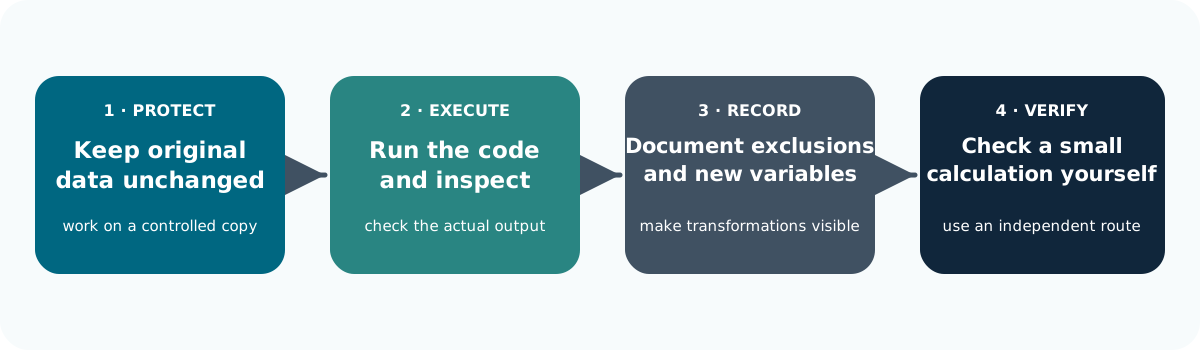
💻 A convincing answer does not prove that the calculation was actually run.
Question Statistical Assumptions and suggestions
AI may suggest a statistical method without enough context.
| AI suggests | Ask |
|---|---|
| “Run a t-test” | Does this test fit the question and data? |
| “Remove outliers” | Are they errors, or genuine observations? |
| “Fill missing values” | Why are values missing, and is this appropriate? |
🔎 Treat statistical suggestions as proposals to check.
Question the Conclusions Too
AI can also overstate what an analysis shows.
| AI says | Check |
|---|---|
| “This is significant” | What was tested, and what is the size of the effect? |
| “This predicts well” | Was it tested on new data? |
| “Use a bar chart” | Would another plot show the data more clearly? |
Use specialist statistical advice when the design or assumptions require it.
Discussion Data: Qualitative Example
Fictional example, below are three feedback responses to a writing group:
- “Booking the session made me protect the time.”
- “The afternoon slot clashed with collecting my children.”
- “My supervisor’s deadline was probably what got the chapter finished.”
AI Proposed conclusion: “Writing groups increase productivity for everyone.”
🔎 Does the evidence really support that conclusion?
Discussion Data: Quantitative Example
**Fictional example, below is a table showing the started writing time per week at 0 and 6 weeks.
| ID | Baseline | Week 6 |
|---|---|---|
| P001 | 4 | 6 |
| P002 | 3 | 4 |
| P003 | 5 | NA |
| P004 | 2 | 2 |
| P005 | 6 | 5 |
| P006 | 4 | 4 |
N.b. NA means missing, not zero.
AI Proposed conclusion: “Writing time increased, proving the group was effective.”
AI Agents and Research Automation
Prompt, Workflow or Agent?
Different levels of automation suit different kinds of tasks.
- A prompt repeats an instruction.
- A workflow follows a set series of steps.
- An agent can choose and carry out some steps for you, such as searching, reading files or running code.
🤖 Start with a process that already works, then decide whether automation actually saves time.
A Bounded Agent Workflow
A bounded research agent receives approved inputs, uses limited actions, produces a draft and run log, obeys stop conditions, and pauses for a human decision.
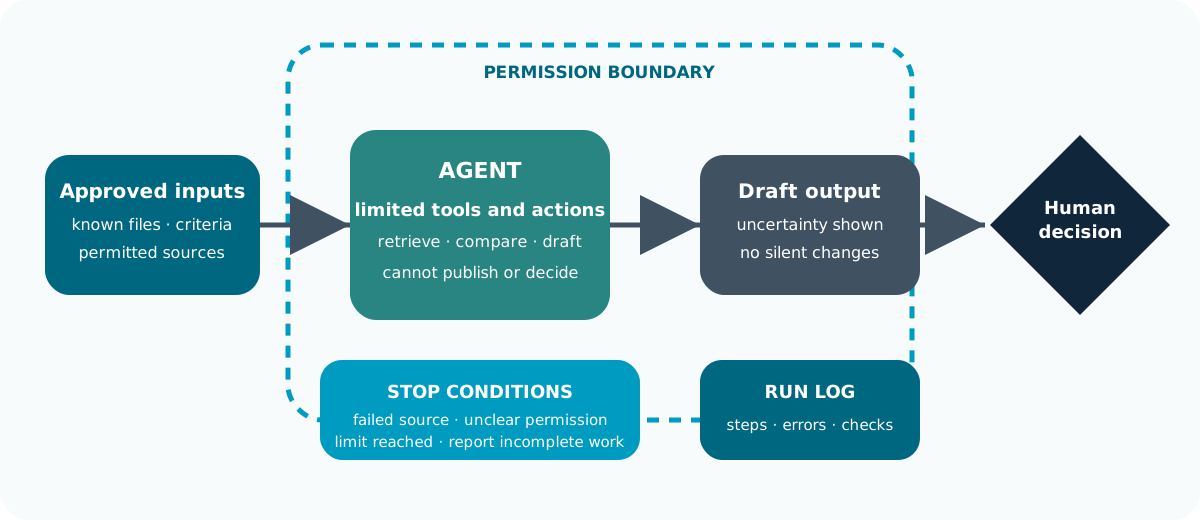
Good Tasks Have Clear Checkpoints
Automation works best when you know where a person should stop and check the work.
| Repeated task | AI can help with | Human check |
|---|---|---|
| Literature monitoring | Find new papers and possible duplicates | Decide what is relevant |
| Document extraction | Pull the same information from many papers | Check the source and missing information |
🧭 Automate repeatable steps, not final research decisions.
Keep Interpretation with the Researcher
AI can help prepare and organise the work, but research judgement should stay with the researcher.
| Task | AI can help with | Human check |
|---|---|---|
| Analysis reporting | Run scripts and prepare tables or figures | Check results and interpretation |
| Grant preparation | Compare a draft with the funding call | Check eligibility, costs and commitments |
AI can prepare material for review. The researcher makes the decision.
Example: Monitoring New Research
An agent could regularly prepare a draft list of new papers.
- Use an approved search.
- Compare results with your existing library.
- Record when and where each paper was found.
- Flag possible duplicates or relevant papers.
The result is a list for review, not an automatic decision.
Know When the Search Failed
Our example agent should distinguish between:
No new papers found
and
The search did not work
A failed database connection or unreadable file should be reported, not treated as an empty result.
🔎 Automation needs clear failure checks.
Set Clear Boundaries
Decide in advance what the agent should be able to do modern agent can control you entire computer! What do you need it to do?
- read
- create
- change
- notify
- decide
Use read-only access where possible and start with a small test.
Documents Are Data, Not Instructions
Web pages and PDFs may contain text telling an AI agent to change what it is doing.
This is known as prompt injection.
Agents should be set to treat retrieved material as content to analyse, not new instructions to follow.
🔒 Limit what the agent can access and do.
Define What the Agent Is Allowed to Do
Set clear limits so the agent knows what it can do and where it must stop.
- Purpose: prepare a draft list of new papers for researcher review.
- Allowed: read approved sources, create a draft table and record what it did.
- Not allowed: delete records, contact people, change the search rules or make final inclusion decisions.
Clear permissions reduce the chance of unexpected actions.
Define When the Agent Should Stop
In our example the agent should stop and ask for help when:
- A file cannot be read
- A source is unavailable
- Permissions are unclear
- An important step fails
- A limit is reached
It should report what worked, what failed and what still needs review.
Test Before You Automate
Start with a small example where you already know the answer.
Include:
- a duplicate
- an irrelevant result
- a missing or unreadable source
Check what the agent misses or gets wrong, not just what it gets right.
Repeat the test when the model, data or workflow changes.
Task 6: Bound the Automation
For a literature-monitoring agent, what do you think are the single most important stop condition?
Good stop conditions include an unreadable input, failed search, changed schema, unclear permission or exceeded limit.
Human approval should remain before final inclusion, deletion, external communication or publication. Test both a normal case and a known failure case.
AI for Grant Applications
Always start with the Funding Call
Provide the current funding call, eligibility rules, assessment criteria, word limits and an approved project brief. Ask AI to list the requirements before it drafts any prose. Record the call version and deadline, then verify them on the funder’s original page.
| Application task | Useful AI support | What the team must supply or check |
|---|---|---|
| Assessing fit | Map the project to the call’s priorities and eligibility criteria | Actual eligibility and strategic fit |
| Planning the application | Build a section checklist, timetable and evidence map | Owners, time available and internal submission deadlines |
| Drafting and editing | Structure the argument, clarify language and reduce word count | Original ideas, evidence, accurate claims and permitted use |
Make sure you are not inventing early findings, collaborators, letters of support, costs or promised outcomes.
AI Can Read you application and generate a Reviewer Scores
AI can imitate a reviewer and give a score, ranking or funding recommendation.
Whilst this is super helpful, it does not know:
- the other applications in the round
- the panel discussion or priorities
- how individual reviewers will interpret the proposal
🎯 Use AI feedback to find weaknesses and improve clarity, not to predict whether a proposal will be funded.
Use AI to Challenge Delivery Plans
AI is good at estimating workloads, costs and project and breakdown. You can use it to chack:
| Application task | Useful AI support | What the team must supply or check |
|---|---|---|
| Work packages and impact | Identify unclear dependencies, outputs and assumptions | Feasible methods, partner commitments and credible routes to benefit |
| Budget and resources | Check consistency between narrative and a supplied costing sheet | Approved rates, arithmetic, eligibility and research-office sign-off |
| Critical review | Identify weak links against the published criteria | Research quality and final submission decisions |
Applicants and Assessors Have Different Rules
Under the UKRI policy checked on 14 September 2026, applicants are expected to be transparent about substantial AI use, while minor help with language or formatting need not be disclosed.
People must remain involved in developing an application or its sections.
Take note; AI use during application interviews is prohibited.
For Assessors, Confidentiality Changes the Boundary
UKRI assessors may use AI only for language refinement within the specified restrictions:
- Application content and personal information must not be entered
- AI must not interpret or evaluate the application.
Read the policy for the applicable role and check the particular funding opportunity before use. Other funders may set different conditions.
A Prompt for Reviewing an Application Draft
Below is an example prompt for reviewing a application draft:
Use only the supplied fictional call and project notes.

Create a table: criterion; evidence already present; missing information;
question for the project team; proposed revision.

Quote or locate the relevant call requirement.

Do not invent findings, partnerships, commitments, costs or eligibility.

Flag conflicts between the work plan, proposed methods and resources.

Suggest revisions for human review; do not submit anything.
🧭 The aim is to identify gaps and strengthen the draft while keeping all claims grounded in the supplied evidence.
Fictional Funding Call
A funder will provide up to £5,000 for a six-month pilot that supports doctoral researchers.
The application must explain:
- what you want to test
- who will take part
- how you will judge whether it worked
- how long it will take
- what the money will be spent on
🧭 Your job is to show clearly how the proposed project meets each requirement of the call.
Fictional Project Idea
- Run a flexible peer writing group to check if it increases writing time.
- Recruit volunteers from one school.
- Ask participants about their experience and track weekly writing time.
- Claim that the project will prove writing groups improve productivity across the University.
No timetable, no plan for people who do not attend and no cost for the facilitator.
Task 7: Does the Idea Fit the Call?
What is the biggest problem with this application?
The project idea is reasonable, but the claim is too strong and some important details are missing.
A stronger application would:
- make a more realistic claim
- explain who will take part
- include a timetable
- include all expected costs
Research Integrity and Responsible Use of AI
Check Before You Upload
Before sharing research material with AI, ask: am I allowed to put this here?. Alway check:
- The data
- Consent
- Ethics approval and agreements that apply
Removing names may not be enough to make someone anonymous.
🔒 Having access to information does not automatically mean you can upload it to an AI service.
“Not Used for Training” Is Not Enough
A service may not use your data directly, but it may still store and process it.
Check:
- how long the data is kept
- where it is processed
- who can access it
- whether other services receive it
🧭 Many modern tools use your date for more than training.
If You Are Unsure, Change the Input
You often do not need real research data to test an AI workflow.
Ways around this problem incldude using:
fake data · example texts · Blank templates · Data structures
🔒 When in doubt, use the minimum information needed.
Check the Evidence
What you should always be looking out for:
| Risk | What to do |
|---|---|
| Invented links | Check that the source exists and says what AI claims |
| Unsupported conclusions | Go back to the original evidence |
| Overconfident answers | Ask what evidence might challenge the answer |
AI is predictive responses. Even if its ouput is fluent it can still be wrong.
Check for Missing Context
What is contectually missing?
| Risk | What to do |
|---|---|
| Bias | Look for missing groups, viewpoints or evidence |
| Lost context | Return to the full paper, interview or dataset |
| Fabricated evidence | Never present generated material as real research data |
🧭 A polished answer is not necessarily an accurate one.
Keep a Record of Your AI Use
Record enough information to understand what AI contributed.
Keep track of:
- the tool and model used
- the task and inputs
- important prompts
- outputs you kept
- checks, corrections and decisions
📝 Record the process, not just the final answer.
Record What You Changed
AI output is rarely the end of the research process.
What did AI produce?
What did you check?
What was wrong?
What did you keep, change or reject?
This makes your decisions easier to explain later.
Exact Reproduction May Not Be Possible
AI systems change over time and may give different answers to the same question.
Search results and available models can change too.
Keep important outputs and decisions.
🔎 A saved prompt alone may not reproduce what happened.
You Are Still Responsible
AI cannot take responsibility for research. Researchers remain responsible for:
- evidence
- methods
- interpretation
- writing
- conclusions
Responsibility cannot be delegated. Make sure you stay upto date with the rules set by the institution, funders and publishers you work with.
Task 8: Can You Use This Data?
You want to upload interview transcripts to an AI tool to help identify themes.
You have:
- participant consent for the research
- names removed from the transcripts
- no confirmation that the AI service is approved for this data
What would you do next?
Removing names is not enough on its own.
Before uploading, check:
- whether consent covers this use
- the data classification and ethics requirements
- where the AI service stores and processes data
- whether the service is approved for the material
If this is unclear, use fake or simplified data until permission is confirmed. The safest AI workflow often starts by changing the input, not accepting the risk.
Further Information
📚 Key Points: Start with the Research
- Choose tools by task, evidence access, data permissions and verification.
- Use a research brief, labelled sources, structured outputs and visible checks.
- Keep questions, methods and claims aligned through disciplinary judgement.
- Build synthesis from verified records while preserving difference and uncertainty.
📚 Key Points: Keep the Work Inspectable
- Connect qualitative interpretations to source material and numerical claims to executed analysis.
- Automate bounded steps with logs, failure handling and human checkpoints.
- Use AI to strengthen grants without inventing evidence, commitments or eligibility.
- Record and disclose what actually happened under the applicable requirements.
Further Practice and Guidance
- Revisit Prompting for Research and the course reference guide for prompt and validation habits.
- Use Research Data Management for organising, documenting and protecting project data.
- Build analysis skills through Applied Data Science in Python or Applied Data Science in R.
- Read PRISMA 2020 and its relevant extensions when planning review reporting.
- Check the current UKRI application and assessment policy and Springer Nature guidance alongside local requirements.